Broker retirement
The Authentication Broker will be retired soon. It is recommended to migrate all Brokers as soon as possible. After the Broker is retired, it will no longer be available or supported for use on the Platform.
Why is the Broker being retired
In October 2021, we removed the ability to install a Broker. New users who did not have a Broker installed before October 9, 2021, cannot view the option to install a new Broker or Broker-based authentication sources such as OpenID and SAML. For users who already had a broker installed, we provided a notice that the Broker will be deprecated. We have stopped prioritizing enhancement requests for the Broker including not updating it to the latest version of Java.
Boomi is retiring the Broker because it is complex to install, deploy, maintain, and has resulted in performance issues. The Broker also adds cost, and does not support all the authentication flows of OAuth2.0. Boomi has released JWT and Basic Authentication on Gateway and this makes the Broker feature redundant. You no longer need the Broker to talk to a third party identity provider.
Retirement timeline and what to expect
-
The Broker will be retired soon. At that time we will stop supporting the Broker and it will not be available for use on the Platform.
-
In January 2022, we provided the Basic Authentication Migration feature for you to easily convert existing Broker-based Basic Authentications to Basic Authentication on the Gateway. For more information, refer to the information below.
-
In May 2022, we provided a multi-mode authentication option on the Shared Web Server, that will help in ease of migration onto the Gateway without incurring an extra overhead cost or disruption in service.
How to migrate
-
If you use Basic Authentication, you must use the Basic Authentication on Gateway option for creating an Authentication Source. For more information, refer to Authentication Source settings for Basic Authentication (Gateway). The Basic Authentication migration feature, will help you migrate easily onto the Gateway without causing a disruption to your service.
-
If you use OpenID, you must now use the JWT option on the Gateway. For more information, see the Authentication Source settings for JWT topic and this community article.
noteEven though the OpenID authentication source is deprecated, you can use the JWT authentication source to implement Open ID with the help of a third party identity provider.
-
If you use SAML, you must now use the JWT option on the Gateway. For more information, refer to the Authentication Source settings for JWT topic and this community article. If you are using Shibboleth as an Identity Provider, we recommend you update the version, since the older versions do not support OpenID. If that is not an option, you will need to install a Broker service on your own such as keycloak.
noteEven though the SAML authentication source is deprecated, you can use the JWT authentication source to implement SAML with the help of a third party identity provider.
-
If you use an external provider (deprecated feature), we recommend that you configure multi-authentication options on the Shared Web Server.
-
If you have a Broker extended as a Gateway, we recommend that you migrate the Broker-based authentication sources to gateway-based authentication sources and then uninstall the broker from the implementation.
Migrate Broker-based Basic Authentication
With the Broker retiring, it is recommended that you migrate your existing Broker-based Basic Authentication to Basic Authentication on the Gateway or OpenID and SAML to JWT. Under the Authentication Type column, you will view your Broker-based authentication listed with a Migrate button next to it. Click the button to start the migration process. You can also use the authSourceBrokerBasicMigrate(id: ID!): AuthSourceBasic! GraphQL mutation for the migration.
Remove Broker after Migrating
After you migrate Broker-based Basic Authentication to Basic Authentication on the Gateway or OpenID and SAML to JWT, you should remove the Broker. To remove, follow the process based on your situation:
-
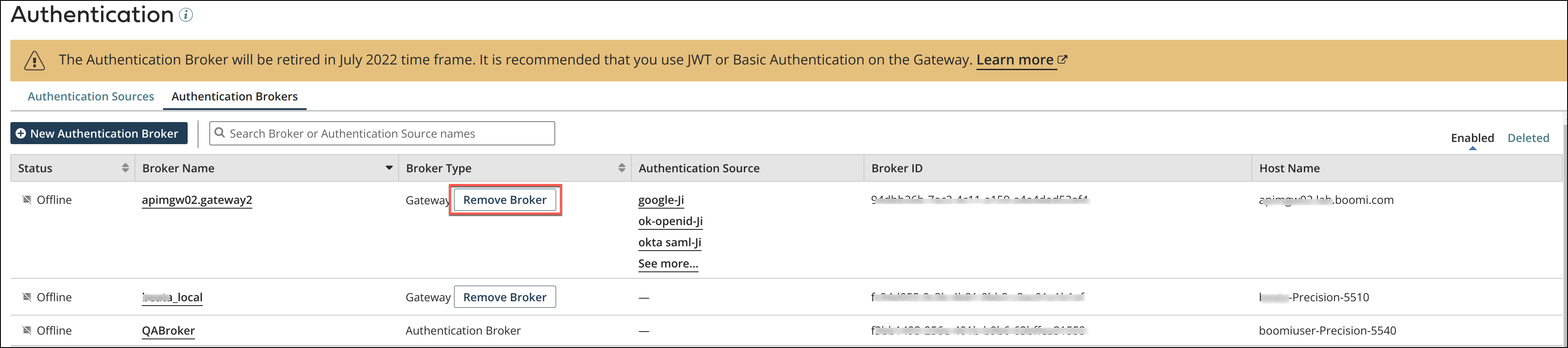
Authentication Broker extended as Gateway - After you migrate the Authentication Sources, you can remove Broker feature by selecting Remove Broker. Once this process is completed successfully, the container will function as an API Gateway only.
-
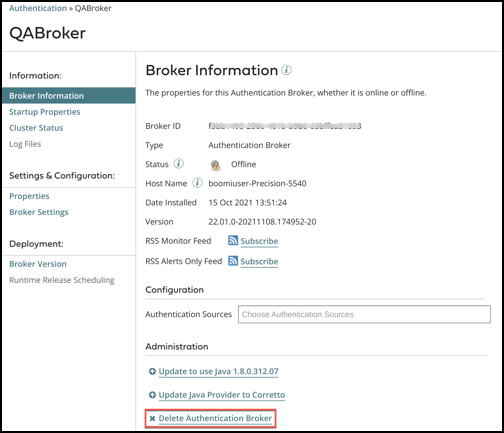
Authentication Broker is functioning as a Broker only - After you migrate the Authentication Sources, you can remove the Broker from the broker panel by selecting Delete Authentication Broker.
cautionDo not uninstall or delete the Broker if you are using the Broker as a Gateway. Uninstalling or deleting the Broker through the Broker Information page or through the uninstall script in the file folder will permanently remove the Broker and the Gateway. Instead, you should remove the Broker from the Authentication page as described above.